Compare loss run workflows
Outmarket AI alternative for loss run requests and claims extraction
Outmarket AI is a broad AI platform for brokerages covering proposals, quote comparison, ACORD forms and policy checking. Its loss run extraction dates from July 2026, and it orders loss runs through a Loss Run Pro integration. LossRunReports is a single-purpose tool that requests loss runs with e-signed authorization, follows up on day 3, 7 and 14, extracts every claim and builds a five-year loss summary, with published plans from $299 a month.

Try the reader on a real loss run
Upload a PDF, scan, XLSX or CSV to inspect the extracted claims. The reader uses OCR and extraction rules. No account needed.
Outmarket AI and LossRunReports compared
Both products extract individual claims. Their scope, ordering setup and billing model differ, so compare the work your team needs to finish.
| What you need | Outmarket AI | LossRunReports |
|---|---|---|
| Built for | Brokerages seeking one AI workspace across placement and service | Agency teams collecting loss history and preparing renewal submissions |
| Loss run ordering | Through the Loss Run Pro integration with your LRP API key. Orders start 60, 90 or 120 days before renewal. | Built in. Request letters with client authorization e-sign, a carrier directory of 30 US carriers, automatic follow-ups on day 3, 7 and 14, and secure carrier upload links. |
| Claims extraction | Claim by claim, with side-by-side review and comparison of extracted totals with document totals. | Claim by claim from PDF, scans, XLSX and CSV, with gap, duplicate and stale valuation checks. |
| Outputs | Branded multi-tab Excel with all claims, line of business summaries, open claims, claims by year, incurred by year, frequency and severity. | Five-year loss summary and XLSX, CSV and PDF exports. Agency adds loss ratio from earned premium, an editable underwriter narrative, and a submission package as PDF and JSON. |
| Other workflows | Broader coverage with proposals, quote and policy comparison, coverage gap analysis, ACORD form filling, COIs and BOR letters. Policy checking is on Enterprise. | Loss runs and the renewal submission only. |
| AMS | Applied Epic bi-directional, AMS360, HawkSoft, ImageRight and Nexsure. Integrations are only on Enterprise. | Book import from an AMS export, CSV or XLSX. |
| Security | Outmarket lists SOC 2 Type II, ISO 27001:2022, ISO 42001 and single-tenant deployment. | For our controls and data handling, see our security page. |
| Pricing and limits | Lite is $83 per seat a month billed annually, listed as $1,000 per seat a year, for 1 to 4 seats. No AMS integrations, a 7-day money-back guarantee and no free trial. Enterprise is quoted with a minimum of 5 seats. |
Broker is $299 a month or $149 a month billed yearly. Includes 50 client accounts and 300 documents a month, with 1 seat. Agency is $1,499 a month or $749 a month billed yearly. Includes 400 client accounts and 3,000 documents a month, with 1 seat. Enterprise is $4,999 a month or $2,499 a month billed yearly. Includes 2,500 client accounts and 20,000 documents a month, with 1 seat. |
Outmarket figures from outmarket.ai pricing and product pages, checked October 2026.
Where each tool fits
Where Outmarket AI is the better fit
Choose Outmarket when you want one AI workspace for proposals, quote comparison, coverage gap analysis and ACORD filling. Its broader scope helps teams evaluating work across placement and service, rather than loss history alone.
Applied Epic shops considering Enterprise should evaluate its bi-directional connection. Check which records and tasks the integration covers during the demo. Lite does not include AMS integrations, so that requirement changes which plan you compare.
Where LossRunReports is the better fit
Choose LossRunReports when getting and reading loss runs holds up the renewal. Requests and follow-ups belong to the same workflow as extraction and summaries. You do not need a Loss Run Pro subscription for ordering.
Published monthly prices let you budget before a sales conversation. Each plan includes one seat, with account and document limits shown above. Compare the work assigned to that seat with your team's actual renewal process before buying.
What switching or adding us looks like
Start with a renewal you already handle. Keep the source reports so your account manager can review the extraction before sending anything to the market.
- 1
Import your book
Bring accounts, policies and prior carriers from an AMS export, CSV or XLSX. Check the imported records against your renewal list.
- 2
Send requests
Have the client e-sign the authorization and send carrier requests. Follow-ups run on day 3, 7 and 14 while you track outstanding reports.
- 3
Receive carrier files
Carriers use secure upload links. You can also upload reports already received by email or ordered through another service.
- 4
Review the summary
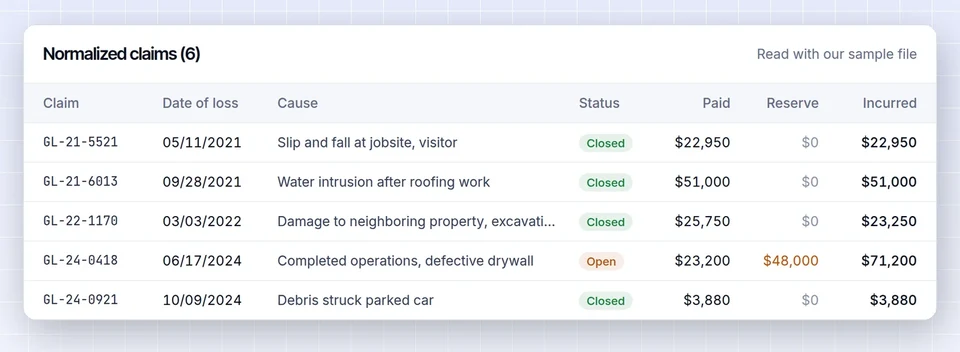
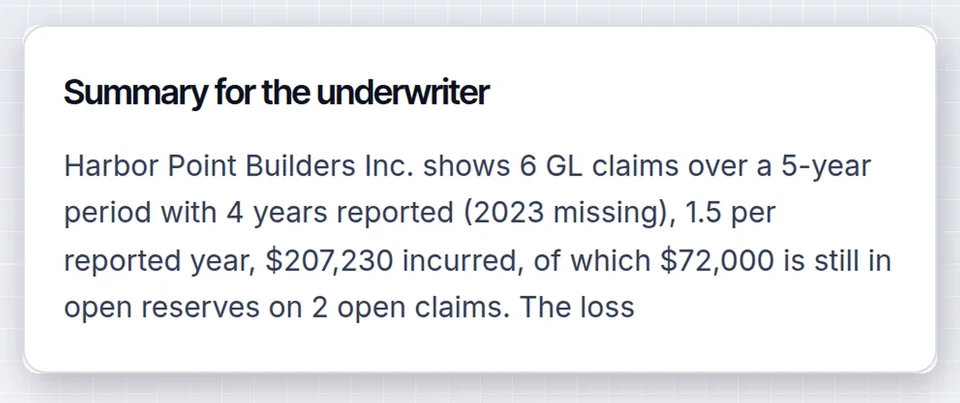
Check extracted claims, missing years, duplicates and valuations. Export the five-year summary, or build the submission package on Agency and Enterprise.
A cost example for a three-person agency
These subscriptions buy different scopes. Outmarket includes proposals and comparisons, while LossRunReports concentrates on loss history and the renewal submission.
Outmarket Lite with Loss Run Pro ordering
For three people, 3 x $1,000 is $3,000 a year for Outmarket Lite. Loss Run Pro lists Standard at $29 per user a month. If all three also subscribe to that plan, 3 x $29 x 12 adds $1,044 a year for ordering.
Confirm API access and the required Loss Run Pro plan before using this budget for the integration.
LossRunReports Broker billed yearly
Broker is $1,788 a year, equivalent to $149 a month billed yearly. It includes 1 seat, 50 client accounts and 300 documents a month, plus requests, follow-ups and extraction.
This is a one-seat workflow budget, not a quote for three users. Choose based on who handles loss runs and whether the broader Outmarket features are also needed.
Outmarket AI alternative questions
What is Outmarket AI?
Outmarket AI is a broad AI platform for insurance brokerages. It supports proposals, quote comparison, ACORD form filling and policy checking, with loss run extraction added in July 2026. It orders loss runs through a Loss Run Pro integration, while LossRunReports focuses on requesting, reading and summarizing loss history.
How much does Outmarket AI cost?
Outmarket AI Lite costs $83 per seat a month billed annually, listed as $1,000 per seat a year, for 1 to 4 seats. Enterprise pricing is quoted with a minimum of 5 seats. Lite excludes AMS integrations. LossRunReports publishes separate monthly and yearly plans, starting at $299 a month.
Does Outmarket AI order loss runs?
Yes. Outmarket AI orders loss runs through its Loss Run Pro integration using your LRP API key. Orders can start 60, 90 or 120 days before renewal. LossRunReports has built-in ordering with e-signed client authorization, secure carrier upload links and automatic follow-ups on day 3, 7 and 14.
Is there an Outmarket AI free trial?
No. Outmarket AI does not offer a free trial. Its Lite plan instead lists a 7-day money-back guarantee, which means paying before evaluating it under that guarantee. You can test the LossRunReports reader on this page without an account, then compare the published plans before choosing a subscription.
What is the best Outmarket AI alternative for loss runs?
LossRunReports is a focused alternative when your main need is loss run requests, carrier follow-ups and claims extraction. It builds a five-year loss summary from PDF, scans, XLSX and CSV. Outmarket AI is a better fit when you also want proposals, quote comparison and ACORD filling in one workspace.
Can I use LossRunReports with Loss Run Pro?
Yes. Upload any loss run you already have, whatever tool ordered it, and the LossRunReports reader extracts the claims. You can keep an existing Loss Run Pro ordering process while using our summaries. Requests are also built in, so most teams do not need a second ordering tool.
Put your next renewal through LossRunReports
Use the reader above to review a report, then choose the plan that fits your loss run workload.
More comparisons and buying guides
Loss Run Pro alternative
Compare ordering with built-in extraction and summaries.
Appulate LossRunner alternative
Compare the request workflow and what follows receipt.
Pibit.AI alternative for agencies
Understand carrier underwriting and agency submission needs.
Best loss run software for insurance agencies
Review the options for collecting and reading loss history.
Loss run software pricing guide
Compare subscription models and the scope each buys.
Loss run analysis and summaries
See how claims become a five-year loss summary.
LossRunReports plans and pricing
Check monthly prices, annual billing and plan limits.
Applied Epic loss run workflow
Plan a book import from your Applied Epic export.