Integrations
Applied Epic Loss Runs With LossRunReports
LossRunReports works with Applied Epic through file import and export. Export your book or renewal list from Applied Epic, map the columns once, and LossRunReports requests loss runs for every account. Finished five-year summaries go back as PDF or XLSX attachments, or through our REST API on Agency and Enterprise plans.
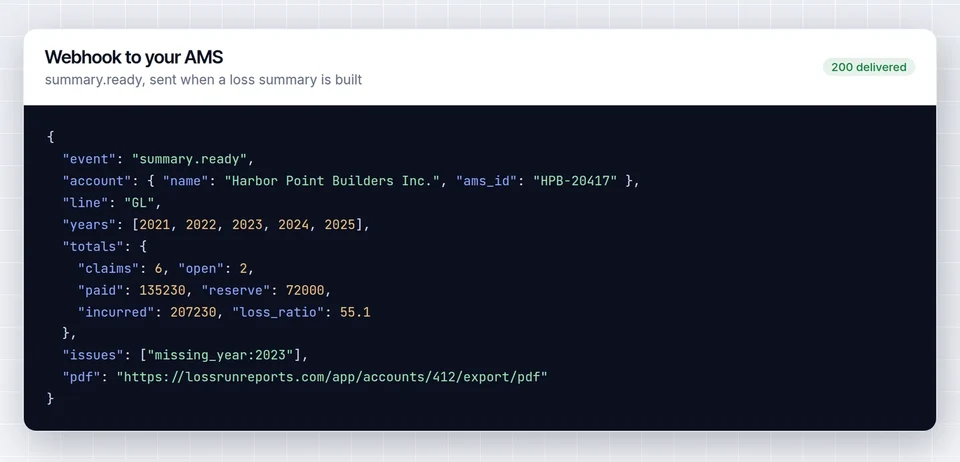

What moves between Applied Epic and LossRunReports
LossRunReports connects to your agency management system by export file with saved column mappings, plus our REST API and webhooks. It is not a certified partner app or a native connector.
Book import from an Applied Epic export file with saved column mappings for client name, FEIN, lines of coverage, policy numbers, prior carriers and expiration dates
Renewal lists filtered by expiration date start loss run requests 90 to 120 days before renewal
Five-year summaries and loss run files saved as PDF or XLSX, ready to attach to the client record
REST API and webhooks on Agency and Enterprise for teams that build their own sync
Set up Applied Epic loss run requests
-
1
Export the book
Run an account or policy list export from Applied Epic to CSV or XLSX.
-
2
Map the columns once
Upload the file and match columns to client name, FEIN, lines, policy numbers, prior carriers and expiration dates. The mapping is saved for the next export.
-
3
Send requests
Choose the accounts up for renewal and send loss run requests with signed letters of authority.
-
4
Attach the results
Download each summary as PDF or XLSX and attach it to the client in Applied Epic, or pull it through the API.
Columns LossRunReports maps
Map them once. The mapping is saved and reused for every later export.
| Field | Used for |
|---|---|
| Client name | Named insured on the request and the letter of authority |
| FEIN | Matching at the carrier, especially for workers comp |
| Lines of coverage | Which loss runs to request |
| Policy numbers | Every term the carrier must report |
| Prior carriers | Where each request is sent |
| Expiration dates | Renewal queue and request timing |
After import, requests follow the process in how to request loss runs, and every reply is read and reconciled by the loss run software.
From request to summary
| Carrier | Policy | Status | Last action |
|---|---|---|---|
| Northfield MutualCA 4471902 | CA 4471902 | Received | Oct 4 |
| Keystone CasualtyGLP 0088213 | GLP 0088213 | Follow-up 2 sent | Oct 9 |
| Granite State CompWC 2215560 | WC 2215560 | Acknowledged | Oct 7 |
| Bayline SpecialtyPKG 771045 | PKG 771045 | Sent | Oct 10 |
| Crestmark IndemnityUMB 30981 | UMB 30981 | Drafted | n/a |
5-yr loss ratio
27.7%
Frequency
2.4 / yr
Open reserves
$61,500
Applied Epic loss run questions
Is this a native Applied Epic connector?
No. LossRunReports connects by export file with saved column mappings, plus a REST API and webhooks your team or integrator can use.
Which Applied Epic fields do I need?
Client name, FEIN, lines of coverage, policy numbers, prior carriers and expiration dates. Extra columns are ignored.
How often should I import from Applied Epic?
Most agencies import their renewal list weekly or monthly. The saved mapping makes each import a single upload.
Other integrations
See your own loss run read in under a minute
Upload one carrier report or use our sample. No account needed for the first read.