Free download
Insurance loss run template for Excel
This insurance loss run template is an Excel workbook with one row per claim and the same columns for every carrier: policy, valuation date, claim number, date of loss, cause, status, paid indemnity, medical and expense, reserves, recoveries and incurred. A summary tab totals claims by policy year and line.
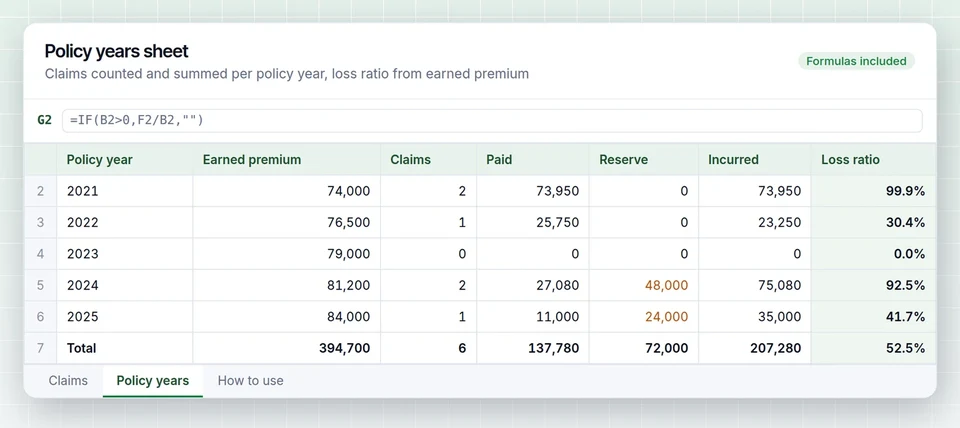
Swipe to see every column

XLSX, no sign-up needed. Works in Excel, Google Sheets and LibreOffice.
The normalized columns
Carriers label the same facts differently. These are the columns underwriters look for, with the names you will see on carrier reports.
| Column | What goes in it | Also printed as |
|---|---|---|
| Carrier | The insurer that issued the policy | Company, writing company |
| Policy number and term | Policy number with start and end date of the term | Policy period, effective and expiration |
| Line of business | GL, auto, WC, property, umbrella and so on | Coverage, LOB |
| Valuation date | The date the figures were run | As of date, evaluated as of |
| Claim number | Carrier claim identifier | Claim ID, file number |
| Date of loss | When the incident happened | Accident date, DOL |
| Report date | When the claim was reported to the carrier | Date reported, notice date |
| Claimant | Injured person or third party | Claimant name, injured worker |
| Cause | What happened, mapped to one cause list | Description, accident type, cause code |
| Status | Open, closed or reopened | Claim status, O, C, R |
| Paid indemnity | Payments to the claimant or for the loss itself | Loss paid, indemnity paid, BI or PD paid |
| Paid medical | Medical payments, mostly workers comp and med pay | Medical paid, med |
| Paid expense | Defense and adjusting cost | ALAE paid, expense paid, LAE |
| Reserves | Amount still expected to be paid on open claims | Outstanding, case reserve, O/S |
| Recoveries | Subrogation and salvage collected | Subro, salvage, recovered |
| Incurred | Paid plus reserves minus recoveries | Total incurred, net incurred |
For a column-by-column reading of a carrier report, see what is a loss run report.
How to fill the template
One workbook per insured, one row per claim, and a summary by policy year and line.
Claims. Enter one row per claim, per valuation. If a carrier sends a newer report, replace the old rows for that policy rather than adding to them, or the same claim will be counted twice.
Policies. List every policy term in the five-year window, including terms with no claims, and note earned premium where you have it. Loss ratio needs it.
Summary. Total by policy year and line: claim count, paid, open reserves, incurred and loss ratio. Count claims at or above your large loss threshold separately.
Keep incurred consistent. Some carriers print incurred net of recoveries and some gross. The template column is paid plus reserves minus recoveries, so a gross figure from a carrier will not match until recoveries are entered.
- CA-22-00143Closed
Jackknife, third party injury
01/27/22Incurred $82,900 - CA-23-00388Closed
Side-swipe on lane change
04/05/23Incurred $13,550 - CA-24-00266Open
Intersection, two claimants
02/21/24Incurred $77,100 - CA-25-00112Open
Rear-ended, insured struck
01/16/25Incurred $24,150 - CA-25-01120Open
Lane departure
10/04/25Incurred $14,440
| Claim | Loss date | Status | Paid | Reserve | Incurred |
|---|---|---|---|---|---|
| CA-22-00143 | 01/27/22 | Closed | $82,900 | $0 | $82,900 |
| CA-23-00388 | 04/05/23 | Closed | $13,550 | $0 | $13,550 |
| CA-24-00266 | 02/21/24 | Open | $38,600 | $38,500 | $77,100 |
| CA-25-00112 | 01/16/25 | Open | $10,150 | $14,000 | $24,150 |
| CA-25-01120 | 10/04/25 | Open | $5,440 | $9,000 | $14,440 |
CA-23-00388 and CA-23-00391 look like one claim reported twice
Checks before the template goes to a market
Valuation within 90 days
Underwriters reject reports that are stale. Check the valuation date column for anything older than 90 days.
No missing policy years
Every term in the window needs either claims or a no-loss letter. A blank year reads as hidden losses.
No duplicate claims
After a carrier change mid-term, one claim can appear on two reports. Match by date of loss and claimant.
Totals match the carrier
Your sum of paid and reserves per policy should equal the totals printed on the carrier report.
Filling the template by hand takes time on large accounts. LossRunReports reads the carrier PDF, scan or spreadsheet into these same columns, runs every check above and builds the summary with a loss run analysis on top. The loss run software exports to this exact layout, so your team keeps one format.
Mapping carrier reports into the template
Most of the work is mapping. A general liability report may print bodily injury and property damage on separate lines for the same claim, so add them into one row. A commercial auto report may split one accident into several claimant files with suffixes such as 001 and 002. Decide whether to keep them separate, which shows frequency by claimant, or combine them by occurrence, which most underwriters prefer, and stay consistent.
Workers comp reports usually separate medical and indemnity already, which maps directly. Property reports often list a single paid figure with deductible applied, so note whether the amount is gross or net of the deductible.
If a carrier only sends a summary page, request claim-level detail. Our guide to requesting loss runs includes the wording.
Questions about the template
Is the template really free to download?
Yes. The Excel file downloads directly from this page without an account. You can use it for any number of clients.
Why not just paste the carrier totals?
Totals hide what underwriters price on: how many claims, how large, how many are still open. Claim-level rows let you show frequency and severity, not just a number.
Should paid expense be included in incurred?
Most commercial underwriters want incurred including expense, because defense cost is part of the loss. Keep paid expense in its own column so it can be shown either way.
How do I handle a claim that reopened?
Set status to reopened and use the latest paid and reserve figures. Do not add a second row for the same claim number.
Can LossRunReports fill this template for me?
Yes. Upload carrier loss runs and export the normalized claims to XLSX or CSV in the same column order.
Skip the retyping
Upload one carrier loss run and see it in these columns in under a minute.