Product
Loss run software that runs the whole loop
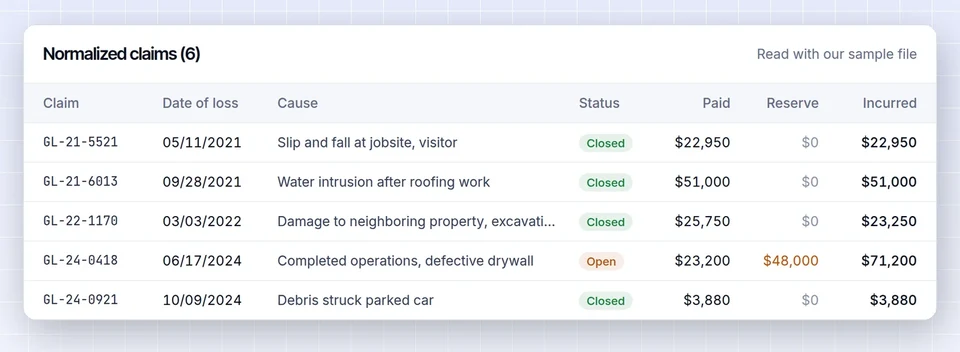
LossRunReports is loss run software for commercial brokers, MGAs and underwriting teams. It sends loss run requests with the insured's e-signed letter of authority, follows up on day 3, 7 and 14, reads PDF, scanned, XLSX and CSV reports into one claims table and builds a five-year summary with loss ratio for the underwriter.
Swipe to see every column

Six steps, one place
Ordering tools stop when the PDF arrives. Reading tools start there. Your account managers need both, connected, for every account in the book.
1. Request
Pick the account and its prior carriers. LossRunReports drafts a request letter per carrier, attaches the letter of authority the insured signed online and sends it to the carrier loss run department from your agency address.
2. Chase
Follow-ups go out automatically on day 3, 7 and 14. Every request shows its status: drafted, sent, acknowledged, received, incomplete or overdue.
3. Receive
Carriers reply to a dedicated inbound address for your agency or use a secure upload link. Attachments are matched to the right request by reference, policy number or link.
4. Parse
Every loss run, whether a native PDF, a scan, a spreadsheet or a CSV export, is read into one claims schema: claim number, date of loss, cause, status, paid indemnity, medical and expense, reserves, recoveries and incurred.
5. Analyze
Totals are reconciled against the carrier totals. Gaps, duplicates and valuations older than 90 days are flagged. The five-year summary shows loss ratio, large losses and open reserves by policy year and line.
6. Submit
One click on Build renewal submission packages the loss summary, currently valued loss runs, ACORD fields, dec pages, SOV and driver or payroll schedules into one file for the market.
New to the process? Our guide on how to request loss runs covers what carriers need, and the loss run request letter page has a template you can copy today.
From scattered PDFs to one claims table
Every carrier formats loss runs differently. Underwriters still want the same answer: how many claims, how big, how much is still open, and against what premium.
LossRunReports reads each report page by page, finds the policy header and valuation date, and lifts every claim into the same columns. Paid indemnity, medical and expense stay separate so a workers comp reviewer can see medical-only claims at a glance, and so a liability reviewer can see defense cost pressure.
Before anything reaches a summary, the extracted totals are compared with the totals printed on the carrier report. If they disagree, the account manager sees which claim is off. Duplicate claims reported by two carriers after a mid-term change are flagged, and so are missing policy years.
The result is a loss run analysis you can defend: frequency, severity, loss ratio from earned premium, large losses and open reserves, with an underwriter narrative your producer edits before it goes out.
- Claim-level detail, not just carrier totals
- Valuation date checked on every report
- Cause of loss mapped to one taxonomy across carriers
- Exports to XLSX, CSV and an underwriter-ready PDF
- CA-22-00143Closed
Jackknife, third party injury
01/27/22Incurred $82,900 - CA-23-00388Closed
Side-swipe on lane change
04/05/23Incurred $13,550 - CA-24-00266Open
Intersection, two claimants
02/21/24Incurred $77,100 - CA-25-00112Open
Rear-ended, insured struck
01/16/25Incurred $24,150 - CA-25-01120Open
Lane departure
10/04/25Incurred $14,440
| Claim | Loss date | Status | Paid | Reserve | Incurred |
|---|---|---|---|---|---|
| CA-22-00143 | 01/27/22 | Closed | $82,900 | $0 | $82,900 |
| CA-23-00388 | 04/05/23 | Closed | $13,550 | $0 | $13,550 |
| CA-24-00266 | 02/21/24 | Open | $38,600 | $38,500 | $77,100 |
| CA-25-00112 | 01/16/25 | Open | $10,150 | $14,000 | $24,150 |
| CA-25-01120 | 10/04/25 | Open | $5,440 | $9,000 | $14,440 |
CA-23-00388 and CA-23-00391 look like one claim reported twice
How it compares with the usual options
Most agencies today use one of three approaches. Each solves part of the job.
| Capability | Email and Excel | Ordering-only services | AI readers sold by demo | LossRunReports |
|---|---|---|---|---|
| Request letters with e-signed authorization | Manual | Yes | No | Yes |
| Automatic follow-ups on day 3, 7 and 14 | Calendar reminders | Often | No | Yes |
| Inbound address and upload links per agency | Shared inbox | Portal | Upload only | Yes |
| Claims extracted into one schema | Retyped by hand | No, PDF only | Yes | Yes |
| Totals reconciled, gaps and stale valuations flagged | If someone checks | No | Varies | Yes |
| Five-year summary with loss ratio | Built per account | No | Varies | Yes |
| Renewal submission package | Assembled by hand | No | Sometimes | Yes |
| Published price, self-serve start | Staff hours | Often | No, sales call first | Yes, from $299 a month |
Already on an AMS? Loss runs, claims and summaries move in and out of Applied Epic, AMS360, HawkSoft, EZLynx, Salesforce and HubSpot by file mapping or REST API. See integrations.
Plans and what they include
Flat subscriptions with a monthly limit of client accounts and documents. No per-document fees. Yearly billing saves 50 percent.
Broker
$299 per month
or $149 per month billed yearly
- 50 client accounts a month
- 300 loss run documents a month
- 3 seats
- Requests, follow-ups, extraction, five-year summary, exports
Agency
$1,499 per month
or $749 per month billed yearly
- 400 client accounts a month
- 3,000 documents a month
- 15 seats
- Loss ratio, AI narrative, renewal pipeline, AMS sync, submission builder
Enterprise
$4,999 per month
or $2,499 per month billed yearly
- 2,500 client accounts a month
- 20,000 documents a month
- SSO, audit log export, retention controls
- REST API and webhooks, MGA mode
Questions before you switch
Do carriers need to sign up for anything?
No. Carriers receive a normal email request with the signed letter of authority. They reply by email to your agency inbound address or use a one-time upload link. Nothing changes on their side.
How accurate is the claims extraction?
Every report is reconciled against the totals the carrier printed. When extracted claims do not add up to those totals, the difference is flagged on the account so a person reviews it before the summary goes out.
Can we try it on our own loss run first?
Yes. Upload one carrier report on the home page and see the extracted claims, totals and loss ratio in under a minute, without an account.
What happens to documents after we cancel?
You keep access until the end of the paid period and can export everything. After that, documents are deleted on your retention schedule.
Is our data used to train AI models?
No. Loss runs, claims and summaries are never used to train AI models. Details are on the security page.
Which lines of business does it handle?
General liability, commercial auto, workers compensation, property, package, umbrella and professional lines. Any carrier report that lists claims can be read.
See your own loss run read in under a minute
Upload one carrier report or use our sample. No account needed for the first read.