Submission builder
ACORD forms software for renewal submissions
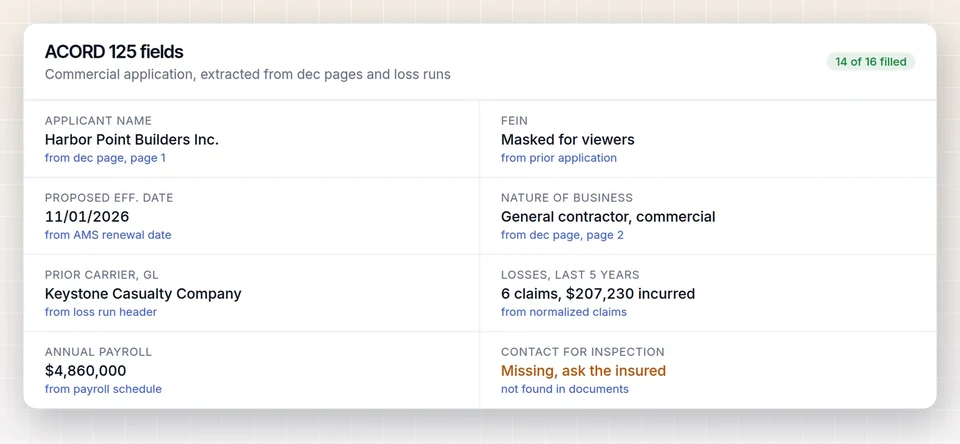
LossRunReports reads ACORD 125, 126, 130 and 140 applications, dec pages, schedules of values, driver lists and payroll reports, extracts the fields into structured data and shows each value next to its source. The fields flow into the renewal submission together with the five-year loss summary, so nobody retypes last year's application.
Swipe to see every column

The ACORD forms a commercial submission uses
ACORD forms are the standard application layouts US carriers accept. These four carry most commercial package and workers comp business.
| Form | Purpose | Key fields we extract |
|---|---|---|
| ACORD 125 | Commercial insurance application, the common applicant section | Named insured, FEIN, mailing and location addresses, nature of business, years in business, prior carrier history, loss history summary |
| ACORD 126 | Commercial general liability section | Classifications and codes, exposure basis, premises and operations, products and completed operations, limits requested |
| ACORD 130 | Workers compensation application | States, class codes, estimated payroll by class, number of employees, officers included or excluded, experience mod |
| ACORD 140 | Property section | Locations and buildings, construction, occupancy, protection class, building and contents values, deductibles |
Loss history on the ACORD 125 is only a summary. Markets still want the carrier reports behind it, which is why the same account also tracks the loss run requests for each prior carrier.
From last year's application to this year's package
Most renewal applications change in a handful of fields. The rest is copied by hand from a PDF. That is the part we remove.
Upload the prior ACORD application, filled PDF or scan. LossRunReports reads every page, identifies the form and its sections, and extracts each field into the account. Values that were unclear on a scan are marked for review instead of guessed.
Dec pages fill in policy numbers, terms, limits and premiums. A schedule of values in Excel or PDF becomes a location list. Driver lists and vehicle schedules become structured tables. Payroll reports are grouped by state and class code for the ACORD 130.
Your team updates what changed this year, such as a new location, more drivers or higher payroll, and the corrected values are kept on the account for next renewal.
- Each value linked to the page it came from
- Unclear fields flagged, never invented
- Changes tracked per renewal
- Export to PDF, XLSX, JSON or your AMS
- Loss summary, 5 years, all linesPDF and XLSX
- Currently valued loss runs (4 carriers)4 PDFs
- ACORD 125 and 129 prefilled from prior applicationFields extracted
- Schedule of vehicles and driver listXLSX
- Large loss narrative for CA-24-00266Edited by producer
Why ACORD data and loss runs belong together
One account record
Applicant data, policies and claims sit on the same account, so the loss summary and the application never disagree about years or carriers.
One submission
Build renewal submission packages ACORD fields, dec pages, schedules and the five-year loss summary into one PDF plus structured JSON.
One integration
The same mappings move ACORD data and claims to Applied Epic, AMS360, HawkSoft, EZLynx, Salesforce and HubSpot, or through the REST API.
The full flow is described on the commercial insurance submission automation page. Available AMS connections are listed under integrations.
Review stays with your team
Extraction saves the typing. Checking what the insured actually does this year is still the account manager's job, and the screen is built for that.
Each extracted field shows the value, the form and page it came from and a small preview of the source. Fields that changed since the last renewal are highlighted, so the review starts with what matters: a new location on the ACORD 140, a different class code on the ACORD 130, a revised description of operations on the ACORD 125.
When values disagree between documents, for example payroll on the application and payroll on the latest payroll report, both are shown and the account manager picks the right one. Nothing is overwritten silently.
Once reviewed, the data is saved on the account. Next year the renewal starts from this year's corrected values instead of the original PDF, so the work compounds instead of repeating.
The same review applies to schedules. A driver list with a new driver under 25, or a vehicle schedule with a new heavy unit, is visible before the market sees it. That is the moment to prepare the explanation, not after the underwriter asks.
ACORD forms questions
Do we need an ACORD license to use this?
ACORD forms licensing applies to the use of the form layouts themselves. LossRunReports reads the data from forms you already have and keeps it as structured fields on the account. Agencies that print ACORD forms should keep their own ACORD membership in order.
Can it read a scanned or handwritten application?
Scanned forms are read with text recognition. Typed or printed fields extract reliably. Handwritten fields are marked for review rather than guessed.
Which ACORD forms are supported?
ACORD 125, 126, 130 and 140 are extracted field by field. Other forms and supplemental applications are stored with the submission and included in the package.
Does it fill carrier-specific supplementals?
Carrier supplementals vary too much to fill automatically. They are attached to the account and included in the submission package as documents.
Which plan includes ACORD extraction?
ACORD field extraction is part of the submission builder in the Agency and Enterprise plans.
See your own loss run read in under a minute
Upload one carrier report or use our sample. No account needed for the first read.