For MGAs and wholesalers
MGA submission intake for loss runs
LossRunReports gives MGA and wholesale submission desks one queue for broker submissions. Loss runs in any format are read into one claims schema within minutes, totals are reconciled, stale valuations and missing years are flagged, and each submission gets a triage score so underwriters quote the best risks first.
Swipe to see every column

The submission desk problem
Brokers send what they have. Your desk turns it into something an underwriter can price, often dozens of times a day.
A wholesale or MGA submission arrives as an email with attachments: an ACORD application, three or four carrier loss runs in different layouts, sometimes a broker's own summary that does not match the reports. Before anyone can decide whether to quote, someone has to read every report and add up the claims.
That reading step decides your response time. When it takes a day, good submissions wait behind poor ones, and brokers move on to the market that answered first.
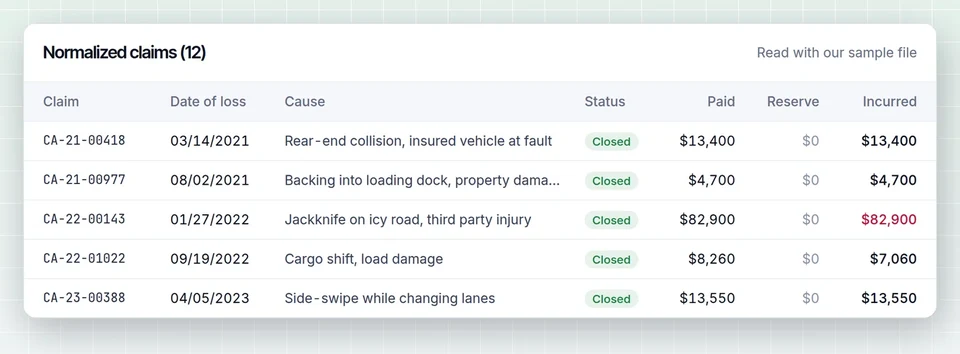
LossRunReports moves that step to minutes. Submissions sent to your inbound address, or uploaded by brokers through a secure link, are matched to a broker and an insured. Each loss run is read into the same columns, whether it is a native PDF, a scan, a spreadsheet or a CSV.
Upload link
Bayline Specialty portal export
PKG771045.xlsx
MGA mode on Enterprise
Built for desks that receive submissions rather than send them.
Inbound submission queue
Every broker submission in one queue, with broker, insured, lines, effective date and document count.
Claims normalized
Claim number, date of loss, cause, status, paid indemnity, medical and expense, reserves, recoveries and incurred, for every carrier.
Gaps flagged
Missing policy years, valuations older than 90 days, duplicates and totals that do not match.
Triage score
A score from frequency, large losses, open reserves and completeness, so the desk sees which submissions to open first.
API and webhooks
Send normalized claims to your rating or policy system as soon as extraction is ready.
Multi-office
Separate desks, programs or offices with their own queues, users and permissions.
Before and after on a typical submission
| Step | Manual desk | With LossRunReports |
|---|---|---|
| Find the loss runs in the email | Open each attachment | Attached to the submission on arrival |
| Read each carrier format | By eye, page by page | Extracted to one schema |
| Total the claims by year | Retyped into a spreadsheet | Calculated and reconciled |
| Spot missing years and stale reports | If someone notices | Flagged automatically |
| Decide what to quote first | First in, first out | Sorted by triage score |
| Ask the broker for what is missing | Separate email | Listed on the submission, ready to send |
The normalized claims feed the same loss run analysis brokers see: frequency, severity, loss ratio, large losses and open reserves by policy year. Underwriting teams that work from those results can read LossRunReports for underwriters, and data handling is described on security.
Faster answers to brokers
Response time is how wholesale and MGA desks win business. The loss run is usually what slows it down.
When a submission is incomplete, the desk often finds out days later, when an underwriter finally opens it. With the gaps listed on arrival, the desk can go back to the broker the same day: the 2022 general liability report is missing, the auto report is valued five months ago, the totals on the broker summary do not match the carrier reports.
Brokers notice. A market that asks the right question quickly gets the complete submission first next time.
For submissions that are complete, the triage score puts the accounts with steady frequency, few large losses and low open reserves at the top of the queue. Underwriters spend their time on the risks that fit the program, and decline the rest quickly and politely.
The score is a sorting aid, not a decision. Every claim behind it is visible, and the underwriter can open the carrier report from any line in the claims table. Background on how carrier reports are structured is on what is a loss run report.
Questions from MGA and wholesale desks
Do brokers need an account to send submissions?
No. Brokers email your inbound address as they do today, or use an upload link you share. They do not sign up for anything.
Can the triage score be adjusted to our appetite?
Yes. You set the weight of frequency, large losses, open reserves and completeness, and the large loss threshold, per program.
How are E&S and admitted programs kept apart?
Each program or desk can have its own queue, users and settings under MGA mode.
Can extracted claims go into our rating system?
Yes, through the REST API and webhooks on the Enterprise plan, or as XLSX and CSV exports.
Can retail brokers see the triage score?
No. The score, the notes and the claims table are visible only to users of your desk. Brokers only see the upload link and any request for missing documents you choose to send them.
What volume does Enterprise cover?
Up to 2,500 client accounts and 20,000 loss run documents a month, with unlimited seats within fair use.
See your own loss run read in under a minute
Upload one carrier report or use our sample. No account needed for the first read.