Compare loss run software
Loss Run Pro Alternative That Also Reads and Summarizes Your Loss Runs
Loss Run Pro is built to order loss runs: e-signed requests on your letterhead, delivered to carriers, tracked on a dashboard. LossRunReports does the ordering too, then keeps going. It follows up on day 3, 7 and 14, reads every PDF, scan or spreadsheet the carrier sends into one claims table and builds the five-year summary your underwriter asks for.
Drop one carrier loss run on the right and see the extracted claims and totals in under a minute, no account needed.
$299
a month, flat, Broker plan with 3 seats
3, 7, 14
days, automatic carrier follow-ups
4 formats
native PDF, scan, XLSX and CSV read
5 years
of claims in one summary with loss ratio
LossRunReports and Loss Run Pro side by side
Both tools send e-signed loss run requests to carriers. The difference is what happens after the carrier replies. Loss Run Pro details below come from its public website as of October 2026.
| What you need | Loss Run Pro | LossRunReports |
|---|---|---|
| Starting price | $29 per user a month (Standard, 1 to 10 users) | $299 a month flat for 3 seats (Broker), $149 a month billed yearly |
| How the price scales | Per user | Per plan, by client accounts and documents a month |
| E-signed request letters | Yes, on your letterhead, 25 signature requests a month on Standard | Yes, letter of authority signed online by the insured |
| Delivery to carriers | Automatic after signature | Sent from your agency address to the carrier loss run contact |
| Follow-ups when a carrier is slow | Scheduled requests (monthly, quarterly, before expiration) | Automatic follow-ups on day 3, 7 and 14 per open request |
| Where carrier replies land | Loss Run Pro dashboard | Your own inbound address plus secure upload links |
| Claims extracted from the returned report | Standardized loss run format listed on Enterprise | Every plan: PDF, scans, XLSX and CSV into one claims schema |
| Totals reconciled, gaps and stale valuations flagged | Not listed | Yes, on every report |
| Five-year loss summary and loss ratio | Dashboards by carrier, insured or claim banding | Five-year summary on every plan, loss ratio from earned premium on Agency |
| Renewal submission package | Not listed | Build renewal submission, Agency and Enterprise |
| AMS connections | Applied Epic, AMS360, HawkSoft listed | Applied Epic, AMS360, HawkSoft, EZLynx, Salesforce, HubSpot |
| Try before paying | Demo request | Upload your own loss run on this page, no account |
Pricing and features change. Check the Loss Run Pro website for its current plans before you decide.
When Loss Run Pro is the better pick, and when it is not
Stay with Loss Run Pro if
- You only need loss runs ordered and someone on staff is happy to read the PDFs.
- Your team is one or two people and a per-user price under $60 a month is the deciding factor.
- Your producers already like the scheduled request routine and nobody retypes claims into Excel.
Look at LossRunReports if
- Account managers spend renewal season copying claims from carrier PDFs into a spreadsheet.
- Markets keep sending back submissions because a policy year is missing or a valuation is stale.
- You want the request, the chase, the extraction and the five-year summary in one place, priced per plan rather than per seat.
- You place middle market or construction, fleet or workers comp accounts where the loss summary decides the quote.

What changes after the carrier replies
Ordering is the first fifth of the job. These are the steps an ordering tool leaves on your desk, and what LossRunReports does with them.
Chasing stops being a calendar job
Every open request gets a follow-up on day 3, 7 and 14 until the carrier answers. The tracker shows sent, acknowledged, received, incomplete or overdue for each carrier.
Replies file themselves
Carriers answer to a dedicated inbound address for your agency or a one-time upload link. Attachments are matched to the right request by reference or policy number.
Claims land in one table
Claim number, date of loss, cause, status, paid indemnity, medical, expense, reserves, recoveries and incurred, in the same columns for every carrier.
Totals are checked before anyone sees them
Extracted claims are reconciled against the totals the carrier printed. Missing policy years, duplicates and valuations older than 90 days are flagged.
The summary is ready for the market
Five-year tables by policy year and line, large losses, open reserves and, on Agency, loss ratio from earned premium with an editable underwriter narrative.
Data goes back to your systems
Export XLSX, CSV, PDF or JSON, or sync with Applied Epic, AMS360, HawkSoft, EZLynx, Salesforce and HubSpot by file mapping or REST API.
The request tracker your CSRs open every morning
Each account shows its prior carriers, when the request went out, which follow-up is next and what has already been received.
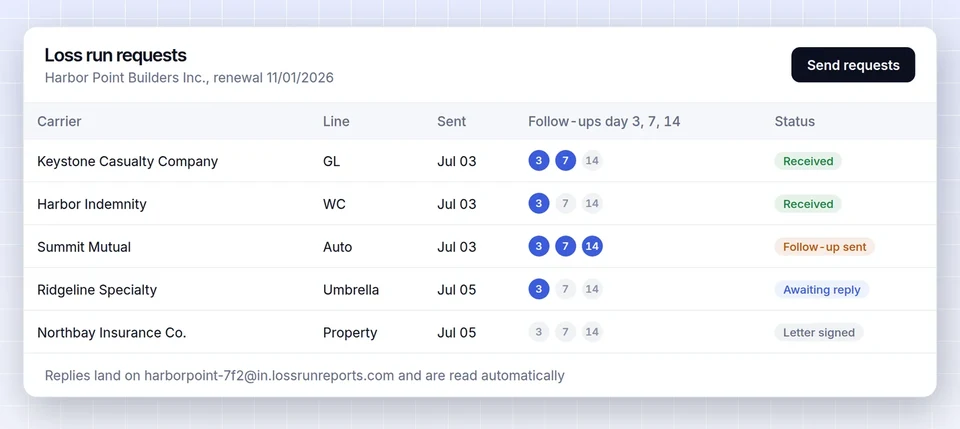
With an ordering-only tool, the request goes out fine, and then the work starts. Someone still has to notice that Travelers answered and Progressive did not, open three PDFs in three layouts and type the claims into the account file.
The tracker closes that loop. When the last carrier report arrives, the account moves to ready, and the loss run analysis is already built from the extracted claims.
Want to see how each carrier handles requests first? The carrier loss run guides show how 16 major US carriers release loss runs and where to send the request.
Switching from Loss Run Pro in four steps
No carrier needs to sign up for anything, and you can run both tools side by side for a renewal cycle.
- 1
Import the book
Export clients from your AMS or from Loss Run Pro as a spreadsheet. Saved column mappings bring in insureds, policies, carriers and expiration dates.
- 2
Send authorizations
Each insured signs the letter of authority online once. LossRunReports drafts one request per carrier and policy term.
- 3
Let the follow-ups run
Requests go out from your agency address. Day 3, 7 and 14 follow-ups run on their own until the carrier replies.
- 4
Review the summary
Claims are extracted and reconciled as reports arrive. Check the flagged items, edit the narrative and export or build the submission.
What the two tools cost for a real agency
Per-user pricing looks cheaper on day one. The honest comparison includes the hours spent after the report arrives.
Loss Run Pro lists $29 per user a month on its Standard plan for 1 to 10 users, so a three-person commercial lines team pays about $87 a month and a ten-person team about $290. That buys ordering, e-signature, delivery and tracking.
LossRunReports Broker is $299 a month, or $149 a month billed yearly, for 3 seats, 50 client accounts and 300 loss run documents a month. Agency is $1,499 a month, or $749 billed yearly, for 15 seats, 400 accounts and 3,000 documents, with loss ratio, the renewal pipeline that starts requests 120 days before expiry and the submission builder.
So if your team only needs requests sent, Loss Run Pro costs less. The math changes when someone on your team retypes claims. If building one five-year summary by hand takes an account manager an hour, 50 accounts a month is 50 hours of payroll, which is far more than the price difference.
Every plan is flat, with no per-document fees. Full details are on the pricing page.
| Team | Loss Run Pro Standard | LossRunReports |
|---|---|---|
| 3 users | $87 a month | $299 a month or $149 billed yearly (Broker) |
| 10 users | $290 a month | $1,499 a month or $749 billed yearly (Agency, 15 seats) |
| Claims extraction and summary | Not on Standard | Included on every plan |
Loss Run Pro alternative questions
What is the best alternative to Loss Run Pro?
For agencies that want more than ordering, LossRunReports is the closest alternative: it sends the same e-signed loss run requests, then follows up automatically, extracts every claim and builds a five-year loss summary. Appulate LossRunner is another ordering option, and AI readers such as FurtherAI or Pibit.AI focus on extraction for underwriters.
How much does Loss Run Pro cost?
Loss Run Pro advertises a Standard plan at $29 per user a month for teams of 1 to 10 users, with 150 loss run requests and 25 e-signature requests a month, and an Enterprise plan for 10 or more users priced on request. Check its website for current figures.
Does Loss Run Pro extract claims data from loss runs?
Its product page focuses on ordering: e-signed requests, delivery to carriers, scheduling and a tracking dashboard. A standardized loss run format is listed on its Enterprise plan. LossRunReports extracts claim-level data from PDF, scanned, XLSX and CSV reports on every plan.
Is Loss Run Pro worth it?
For a small team that only needs loss runs ordered and tracked, Loss Run Pro is inexpensive and simple. It is less of a fit when your bottleneck is reading the reports, reconciling totals and building the loss summary, because that work still lands on your staff.
Do carriers accept loss run requests sent from LossRunReports?
Yes. Carriers receive a normal email request from your agency address with the insured's signed letter of authority attached. They reply by email to your inbound address or through a one-time upload link, so nothing changes on their side.
Can we move our clients from Loss Run Pro?
Yes. Export your client list as a spreadsheet and import it with a saved column mapping, or import straight from Applied Epic, AMS360, HawkSoft or EZLynx exports. Prior carriers and expiration dates come across with the accounts.
Can I test LossRunReports before I cancel anything?
Yes. Upload one carrier loss run at the top of this page and see the extracted claims and totals in under a minute without an account. Then pick a plan and run your next renewals in parallel.
Keep comparing
See your own loss run read in under a minute
Upload one carrier report or use our sample. No account needed for the first read.