
The best loss run software for an insurance agency is the one that covers the part of the job your staff actually loses time on. Ordering tools such as Loss Run Pro and Appulate LossRunner send e-signed requests to carriers. AI readers such as FurtherAI, Pibit.AI and Concirrus turn returned reports into data, mostly for underwriters. LossRunReports does both: it requests, follows up, extracts claims and builds the five-year summary.
That split matters more than any feature list. A commercial lines team rarely struggles to send a request. It struggles with the carrier that never answers, the three PDFs in three layouts, and the hour spent retyping claims before the submission can go to market. Pick the tool that removes your slowest step.
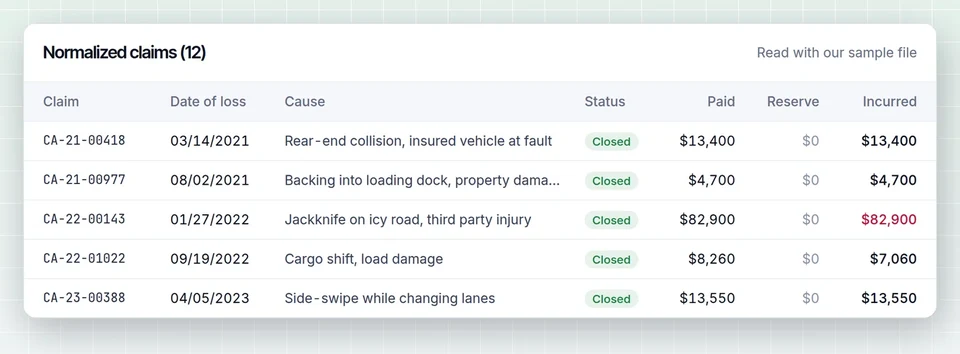
Test any vendor against a real report. Here is ours, no account needed:
Loss run software compared
The table below sorts the tools brokers most often shortlist by what they do. Vendor details come from each company's public website or listing as of October 2026, and accuracy figures are the vendors' own claims, not independent tests.
| Tool | Main job | Built for | Public price |
|---|---|---|---|
| LossRunReports | Request, follow up, extract, reconcile, summarize, build submission | Commercial agencies, MGAs, wholesalers, underwriting teams | From $299 a month flat, $149 billed yearly |
| Loss Run Pro | Order loss runs with e-signature, deliver to carriers, track | Agencies of any size | From $29 per user a month |
| Appulate LossRunner | Request loss runs from ACORD data inside the Appulate platform | Agencies and MGAs already on Appulate | Not published |
| FurtherAI | Read PDF, Excel and CSV loss runs, stitch carriers and years, build loss triangles | Carriers, MGAs, large brokers | Not published, sold by demo |
| Pibit.AI | AI loss run extraction | Underwriters and agencies | G2 lists a single seat plan from $29.99 a month |
| Outmarket AI | Loss run extraction and analysis inside a broker platform | Retail brokers | Not published, sold by demo |
| Concirrus Loss Run Intelligence | Extraction with logic checks (paid plus outstanding equals incurred) | Carriers and MGAs | Not published, sold by demo |
What is the best loss run software for a small agency?
For a small agency with a handful of commercial accounts, the best loss run software is usually the cheapest tool that ends the retyping. If one person orders loss runs and also builds the summaries, an ordering tool alone saves a few minutes per request and leaves the slow part in place. A tool that reads the reports pays for itself on the first busy renewal month.
A practical test: count how many commercial renewals you process a month and how long it takes to turn returned loss runs into something you can send to a market. If the answer is under ten accounts and twenty minutes each, a per-user ordering tool is fine. Above that, extraction and a ready-made summary start to matter far more than the subscription price.
Ordering tools: Loss Run Pro and Appulate LossRunner
Loss Run Pro is the best-known name in loss run ordering. Its site describes e-signed requests sent to insureds on your letterhead, automatic delivery to carriers after signature, scheduled requests (monthly, quarterly or before expiration), alerts and a tracking dashboard. The Standard plan is listed at $29 per user a month for 1 to 10 users, with 150 requests and 25 signature requests a month. A standardized loss run format and policy admin integration are listed on Enterprise. It is simple and inexpensive, and it is a good pick if all you need is the request.
Appulate LossRunner sits inside the wider Appulate platform. It lets an agency import ACORD data or enter it by hand to generate a loss run request. If your agency already uses Appulate for submissions, it is the natural choice. If not, you are buying into a bigger platform to get one feature.
Neither tool is designed to read the loss run that comes back and turn it into a five-year claims table. For a full side by side, see our Loss Run Pro alternative comparison.
AI readers: FurtherAI, Pibit.AI, Outmarket AI and Concirrus
The AI readers start where ordering tools stop. FurtherAI says its loss run module ingests PDF, Excel and CSV files, deduplicates claims across carriers and years and produces loss triangles and frequency and severity trends. Concirrus advertises automated checks that paid plus outstanding equals incurred. Outmarket AI accepts carrier-formatted and scanned files and captures fields such as paid, reserve, recovery and net incurred, and it has announced a partnership with Loss Run Pro for the ordering side. Pibit.AI is listed on G2 with a single seat plan.
These tools are strong at extraction. Most are aimed at carriers and MGA underwriting desks, and most sell through a demo and a custom quote. For a retail agency the gaps are usually the front of the process: they expect you to already have the loss runs, and they do not chase the carrier that has not replied.
Request plus extraction in one tool: LossRunReports
We built LossRunReports for the agency that needs the whole loop. The insured signs the letter of authority online, one request goes to each prior carrier from your agency address, and follow-ups go out on day 3, 7 and 14 until the carrier answers. Replies land in your own inbound address or a secure upload link.
Each report, whether a native PDF, a scan, a spreadsheet or a CSV export, is read into one claims schema with paid indemnity, medical, expense, reserves, recoveries and incurred. Extracted totals are reconciled against the totals the carrier printed, and missing policy years, duplicates and valuations older than 90 days are flagged. The result is a five-year summary by policy year and line, and on the Agency plan a loss ratio from earned premium and a one-click renewal submission. The loss run analysis page shows the output in detail.
Where it is weaker: if you have a two-person team that only orders loss runs and never builds summaries, a per-user ordering tool costs less.
How do I choose loss run software for my agency?
Choose loss run software by testing it on your own worst loss run, not a vendor sample. Pick a scanned report with open reserves and a mid-term carrier change, run it through each shortlisted tool, and compare the extracted claims to the carrier totals. Then check the five points below before you sign anything.
- Which steps does it cover? Request, follow-up, receipt, extraction, reconciliation, summary, submission. Write down which ones stay manual.
- Does it reconcile? Extraction without a check against carrier totals moves the error from typing to reviewing.
- Which formats does it read? Ask specifically about scans and carrier spreadsheets, not just native PDFs.
- Does it flag stale valuations? Most markets want loss runs valued within 60 to 90 days. Our guide to currently valued loss runs explains why.
- Is the price published? A public price and a self-serve start mean you can trial it on a real renewal this week instead of after a sales cycle.
How much does loss run software cost?
Loss run software costs from about $29 per user a month for ordering-only tools to several hundred or a few thousand dollars a month for platforms that also extract and summarize claims. Enterprise AI readers for carriers and MGAs are usually quoted after a demo. LossRunReports publishes its prices: Broker $299, Agency $1,499 and Enterprise $4,999 a month, with yearly billing at half that.
Per-user and flat pricing reward different teams. Per-user pricing is cheap for one or two people and grows with every CSR you add. Flat plans with account and document limits cost more on day one and stay the same when you add seats. Compare against the staff time spent on summaries, not only against each other. Full plan details are on our pricing page.
Is loss run software worth it for a commercial lines team?
Loss run software is worth it when your team handles enough commercial renewals that chasing carriers and retyping claims takes real hours each month. The return comes from three places: fewer days waiting on slow carriers, no manual data entry from PDFs, and fewer submissions sent back because a year is missing or a valuation is old.
It is also worth looking at the rest of the renewal paperwork while you are at it. Many of the same CSRs who chase loss runs also issue and track certificates for the same insureds, and a dedicated certificate of insurance tracking tool takes that work off the shared inbox in the same way.
Frequently asked questions
Is there software that automatically requests loss runs?
Yes. Loss Run Pro, Appulate LossRunner and LossRunReports all send loss run requests to carriers with the insured's e-signed authorization. LossRunReports also sends follow-ups on day 3, 7 and 14 until the carrier replies, then reads the returned report.
Can AI read insurance loss runs?
Yes. AI document readers can extract claim number, date of loss, status, paid, reserve and incurred amounts from PDF, scanned and spreadsheet loss runs. The important check is reconciliation: good tools compare extracted claims to the totals printed by the carrier and flag any difference for a person to review.
What is the difference between loss run ordering and loss run analysis software?
Ordering software gets the report from the carrier. Analysis software turns the report into data and a summary: claims by policy year, large losses, open reserves and loss ratio. Agencies that place middle market accounts usually need both, connected, so each account goes from request to submission in one place.
If you want to see what extraction looks like on your own files, upload one report in the reader at the top of this article, or read our guide on how to request loss runs to tighten the front of the process first.