For agencies that order loss runs and still retype them
Appulate LossRunner Alternative That Reads the Loss Runs It Orders
Appulate LossRunner gets a signed loss run request to the carrier. LossRunReports does that and then finishes the job: it follows up on day 3, 7 and 14, reads whatever the carrier sends back (PDF, scan, XLSX or CSV) into one claims table, checks it against the carrier totals and builds the five-year summary a market asks for.
Drop one carrier loss run into the reader and see the claims and totals it extracts in under a minute.
Where LossRunner stops and where LossRunReports keeps going
A commercial renewal has seven loss run steps. Here is who does which one, based on Appulate's own help center and our product.
Authorization
LossRunner, yes
LossRunReports, yes
Request to carrier
LossRunner, yes
LossRunReports, yes
Carrier reminders
LossRunner, yes
LossRunReports, yes
Reply filed to the account
LossRunner, not described
LossRunReports, yes
Claims extracted
LossRunner, not described
LossRunReports, yes
Totals reconciled
LossRunner, not described
LossRunReports, yes
Five-year summary
LossRunner, not described
LossRunReports, yes
Steps 1 to 3 are where both tools overlap. LossRunner lets you upload a loss run that arrived outside Appulate, but its help center does not describe reading the claims out of it. Steps 4 to 7 are the hours your account managers spend after the carrier answers, and that is where the two products part ways.
Appulate LossRunner and LossRunReports compared
LossRunner details come from Appulate's public help center and blog as of October 2026. Check with Appulate for anything that may have changed.
| What you need | Appulate LossRunner | LossRunReports |
|---|---|---|
| Price | Listed as free for agents in the Appulate help center; premium Appulate features quoted on request | $299 a month flat (Broker), $149 a month billed yearly |
| Where it lives | Inside the Appulate submission and application platform | Standalone web app, works next to any AMS |
| Request letters | Broker of record letter, letter of authorization, agency and insured loss run request letters | Letter of authority signed online by the insured, one request per carrier and policy term |
| Carrier contacts | Appulate keeps carrier email and fax contacts in its database | Carrier directory of 30 US carriers, with the loss run contact your agency adds for each |
| Reminders to carriers | Per-request reminder, 14 business days by default | Automatic follow-ups on day 3, 7 and 14 for every open request |
| Where replies land | Upload loss runs received outside Appulate, up to 20 MB | Your own email by Reply-To, or a secure upload link that files the report on its request |
| Claims extracted from the report | Not described in the LossRunner help center | Every plan: native PDF, scans, XLSX and CSV into one claims schema |
| Totals reconciled, gaps and stale valuations flagged | Not described | On every report, with missing policy years and valuations older than 90 days flagged |
| Five-year loss summary | Not described | Every plan, loss ratio from earned premium on Agency |
| Personal lines | Not available for personal lines or person-type insureds | Built for commercial lines |
| Exports and integrations | Uplink import from Appulate data | XLSX, CSV, PDF, JSON; Applied Epic, AMS360, HawkSoft, EZLynx, Salesforce, HubSpot |
Who should stay on LossRunner, and who should look at us

If your agency already runs submissions through Appulate, LossRunner is a sensible default. It costs nothing extra, it pulls insured and policy data you have already entered, and Appulate keeps the carrier contacts for you. For a shop that places small packages and someone on staff reads each loss run in five minutes, that may be all you need.
The picture changes on accounts like the fleet in this photo. A trucking risk with three carriers over five years can mean a dozen reports in different layouts, open reserves that moved since the last valuation and a market that wants a clean loss summary before it will quote. LossRunner gets those reports requested. Someone still has to read them, add them up and write the summary.
LossRunner fits when
- Your agency lives in Appulate
- You mainly need the letter sent
- Accounts are small and loss-light
LossRunReports fits when
- CSRs retype claims into Excel
- Markets bounce stale or partial runs
- You place fleet, contractors or comp
What happens after the carrier replies
This is the part an ordering tool leaves on your desk. Each screen below is the actual product.
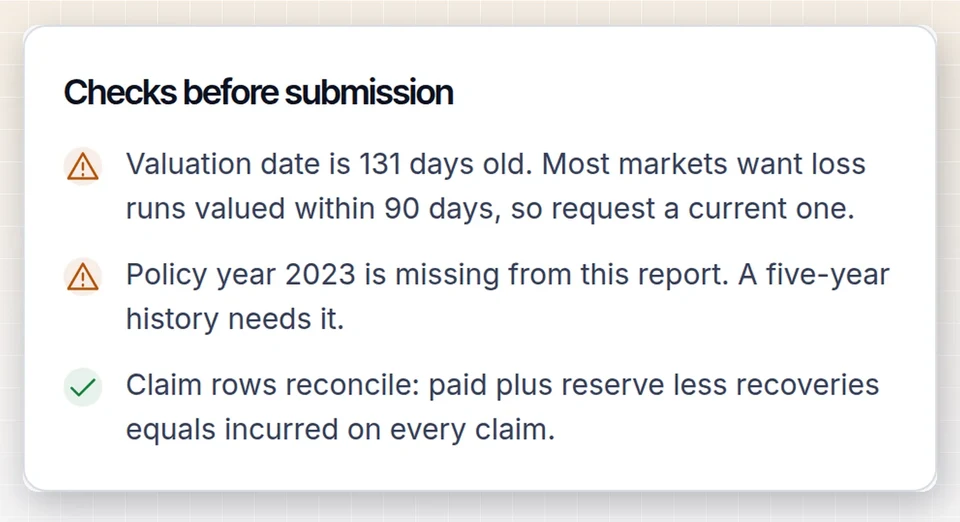
Totals are checked before the market sees them
Every extracted claim is added up and compared with the totals the carrier printed. If a policy year is missing, a claim appears twice or the valuation date is older than 90 days, the account is flagged so you can ask the carrier again before the submission goes out, not after the underwriter calls.
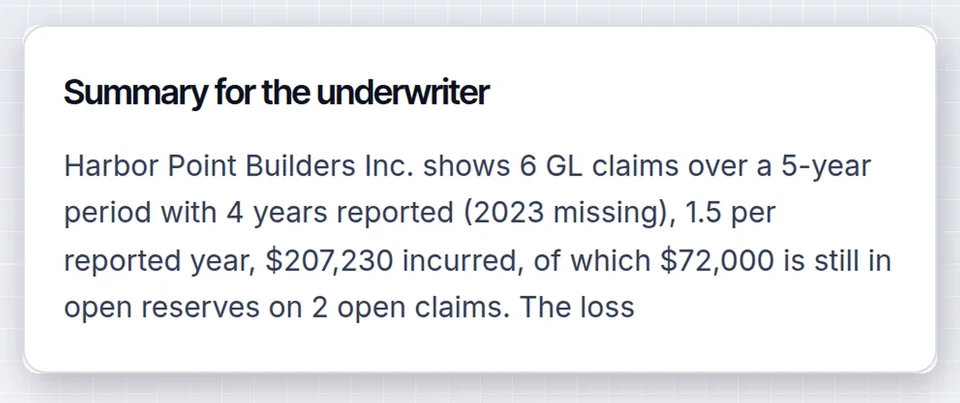
The summary is written for the underwriter
Claims roll up into a five-year table by policy year, with large losses, open reserves and an editable narrative. On the Agency plan, add earned premium and the loss run analysis calculates the loss ratio from earned premium.
Moving off LossRunner without losing a renewal
You can keep Appulate for applications and run loss runs here, or move the whole loss run workflow over. Either way, carriers do not have to change anything.
- 1
Export your accounts
Pull insureds, policies, prior carriers and expiration dates from your AMS or a spreadsheet. Automatic column mapping imports a CSV or XLSX file in one pass.
- 2
Collect signatures once
Each insured signs the letter of authority online. One request per carrier and policy term is drafted from the account.
- 3
Let the chase run
Requests go out as your agency via LossRunReports, with replies set to your email, and follow-ups fire on day 3, 7 and 14 until each carrier answers.
- 4
Send a clean summary
Review flagged items, edit the narrative and export the summary, or build the full renewal submission on Agency.
Free ordering or a paid loss run desk
LossRunner costing nothing is a real advantage. The honest question is what the hours after the reply cost you.
Appulate's help center says LossRunner is now free for agents. For an agency already on Appulate, that settles the ordering step: there is no reason to pay anyone just to send a request letter.
LossRunReports is a paid product because it covers the rest. Broker is $299 a month, or $149 a month billed yearly, for 50 client accounts and 300 loss run documents a month. Agency is $1,499 a month, or $749 billed yearly, for 400 accounts and 3,000 documents, and adds loss ratio, a renewal pipeline that starts requests 120 days before expiration and the submission builder.
Run the numbers on your own book. If an account manager spends 45 minutes turning a returned set of loss runs into a summary, 40 commercial renewals a month is 30 hours. At a loaded cost of $35 an hour that is over $1,000 a month in time, before the follow-up calls. Every plan is flat, with no per-document fees, and the full breakdown is on the pricing page.
Example, 40 renewals a month
- Summary time by hand
- 30 hours
- At $35 an hour loaded
- $1,050
- Broker plan, billed yearly
- $149
- Agency plan, billed yearly
- $749
Illustration using your own inputs. Swap in your hours and payroll cost.
Appulate LossRunner alternative questions
What is a good alternative to Appulate LossRunner?
For a commercial agency that wants loss runs read as well as requested, LossRunReports is the closest alternative. It sends the e-signed request, follows up on day 3, 7 and 14, extracts every claim and builds a five-year summary. Loss Run Pro is another ordering tool, and AI readers such as FurtherAI focus on extraction for carriers and MGAs.
Is Appulate LossRunner free?
Appulate's help center states that LossRunner is now free for agents. Other parts of the Appulate platform are sold with custom pricing after a demo. LossRunReports is a paid product from $299 a month, or $149 a month billed yearly, because it also extracts claims and builds the loss summary.
Does LossRunner read or extract claims from loss runs?
LossRunner's help center describes request letters, e-signatures, carrier reminders, status tracking and uploading loss runs received outside Appulate. It does not describe extracting claims from the reports. LossRunReports reads PDF, scanned, XLSX and CSV loss runs into one claims table on every plan.
Can I use LossRunReports alongside Appulate?
Yes. Many agencies keep Appulate for ACORD applications and submissions and run loss runs through LossRunReports. Import accounts by spreadsheet or AMS export, send requests as your agency via LossRunReports, and export the finished summary as PDF or XLSX to attach to the Appulate submission.
Does LossRunReports work for personal lines?
No. LossRunReports is built for commercial P&C: general liability, workers comp, commercial auto, property and package accounts. LossRunner also excludes personal lines and person-type insureds, so neither tool is the right pick for homeowners or personal auto loss histories.
How fast do carriers send loss runs back?
Many US carriers release commercial loss runs within a few business days of a valid signed request, and some states set a deadline for providing loss information. Slow carriers are where follow-ups matter: LossRunReports chases on day 3, 7 and 14 automatically. Our carrier guides list where each major carrier takes requests.
Keep comparing
Loss Run Pro alternative
The other ordering tool agencies shortlist, side by side.
Best loss run software for agencies
Ordering tools, AI readers and all-in-one options.
Loss run software
The full request to submission loop on one page.
Carrier loss run guides
How 16 major US carriers release loss runs.
See your own loss run read in under a minute
Upload one carrier report or use our sample. No account needed for the first read.